Wyndham Rewards Debit Card Frequently Asked Questions
General Program Questions
To enroll, you must be at least 18 years old, have a valid Social Security number, be a resident of the United States, and meet other eligibility requirements outlined in the Account Agreement.
You can sign up online at wyndhamrewardsdebit.com or through the Wyndham Rewards® Debit App by completing an application and verifying your identity. Once approved, you’ll receive access to your Account via a digital card. Once open, you can load funds and start using your card.
If we are unable to verify your identity using the initial information provided on your application, you may be required to provide additional documentation to continue with opening your account. If this occurs, an email will be sent to you with instructions on what is needed to continue.
A Virtual-First program means your banking experience starts digitally the moment you’re approved. Instead of waiting days for a physical plastic to arrive in the mail, we provide you with a Virtual Card immediately upon account activation. You can add your Virtual Card to your mobile wallet right away to start earning rewards.
Physical cards are optional and are not sent automatically. In order to request a physical card, you will have to have one of the following options set up.
- Set up Direct Deposit or
- Added funds to create a positive account balance.
Once one of the above milestones is met, you will be able to request a physical card by selecting “Request Physical Card” from the “Manage Debit Card” menu within your Online Account Center or Mobile App.
Physical cards are optional and can be requested once Direct Deposit is set up, or your account is funded. If you have ordered a physical card, you should receive your physical card to the address on file in 7-10 business days.
There is no fee to open your Wyndham Rewards® Debit Account. The Wyndham Rewards® Debit Card does have a monthly fee of $6.00, but this will be waived if you maintain an average monthly balance of $2,500.00. Please review the Account Agreement for details.
You can earn rewards in several ways:
- Welcome Bonus: Earn 2,500 bonus points after opening your account, making at least two direct deposits, and spending $100 in the first 90 days.
- Ongoing Rewards: You earn 1 point for every $1 spent on Net Purchases at gas stations, grocery stores and participating Wyndham brand hotels. You will earn 1 point for every $2 spent on all other Net Purchases.
- Anniversary Bonus: You are eligible to earn bonus points based on annual spend each anniversary year, which is calculated from the anniversary of your Card’s opening date, as follows:
| Annual Net Purchases | Anniversary Bonus Points Awarded |
|---|---|
| $5,000.00 - $9,999.99 | 2,500 Points |
| $10,000 - $14,999.99 | 5,000 Points |
| $15,000.00 and above | 7,500 Points |
“Net Purchases” are qualifying purchases made with your debit card, excluding items like returns, refunds, fees, ATM withdrawals, and cash-like transactions. Please see Points Earning Terms for more information.
No, you won’t earn points on any part of a transaction that includes cash back at checkout. For example, if you spend $50 on groceries and request $40 cash back, you won’t earn points on the $90 total or the $50 spent on groceries. To earn points, make your purchase without selecting cashback.
Some transactions don’t qualify for points. Examples include purchases that include cash back, ATM withdrawals, gift card purchases, and peer-to-peer payments (like Venmo and Cash App). For full details, check out the list of ineligible transactions in the Points Earning Terms.
There is no cap on the number of points you can earn. However, certain promotional offers or special categories may have limits. Please review the Points Earning Terms for more information.
Account Setup & Access
To set up your account, visit wyndhamrewardsdebit.com and follow the enrollment process, or download the Wyndham Rewards® Debit App and select the “open account” button. Follow the prompts to verify your identity and create your login credentials.
Visit wyndhamrewardsdebit.com and select Sign In and use the “Forgot username” or “Reset password” feature on the login screen to reset your credentials.
Yes, your account is accessible from both the Wyndham Rewards® Debit App and wyndhamrewardsdebit.com using the same login credentials.
Log into your account, go to the “Legal & Settings” tab and update your details. Some changes may require verification.
Digital App & Web App
The Wyndham Rewards® Debit App is available for download in the Apple App Store and Google Play. Apple® and App Store® are registered trademarks of Apple Inc. Google Play and the Google Play logo are trademarks of Google LLC.
Ensure you’re using the correct credentials and have a stable internet connection. If you’re still having trouble, try resetting your password or contacting customer support at 1-800-608-5970.
Yes, you can add your Wyndham Rewards® Debit card to Apple Pay, Google Pay, or Samsung Pay for contactless payments. First, your card must be active and your account in good standing. Then, open the digital wallet on your mobile phone and follow the instructions.
Log into your account and navigate to the “Manage Debit Card” menu to instantly lock or unlock your card.
Deposits, Spending & Fees
You can fund your account in 4 ways.
- Transfer funds from your external account: Use your Wyndham Rewards® Debit routing and account number to initiate a manual transfer from your external institution. See Account Linking section below to learn more.
- Direct Deposit: Have your paychecks sent straight to your account.
- From a Debit Card: One-time initial funding to your account. This option is available if your account balance is $0, have not set up Direct Deposit or already used the Debit Card funding option. Funds available within minutes.
- Link an external account: Found in the Transfers Menu. Link an account to transfer up to $750 over a rolling 30-day period. For larger amounts, transfer directly from your external account.
Yes, daily and monthly limits may apply. Refer to your Account Agreement for specific limits.
Fees may apply for certain transactions, such as out-of-network ATM withdrawals or foreign transactions. There is also a $6.00 monthly fee. For a full list of fees, refer to your Account Agreement for the fee schedule and other Account details.
The monthly fee is waived if you maintain a monthly average balance of $2,500.
Yes, there are limits on how much you can spend or withdraw per day. You can view these limits in your Account Agreement.
Account Linking FAQs
*The names of the financial institutions referenced in this FAQ are used solely for identification purposes to help you link your external account. All trademarks remain the property of their respective owners. The information provided is accurate as of 10/02/2025 and is subject to change without notice. Procedures, terminology, and navigation steps may vary by institution and over time.
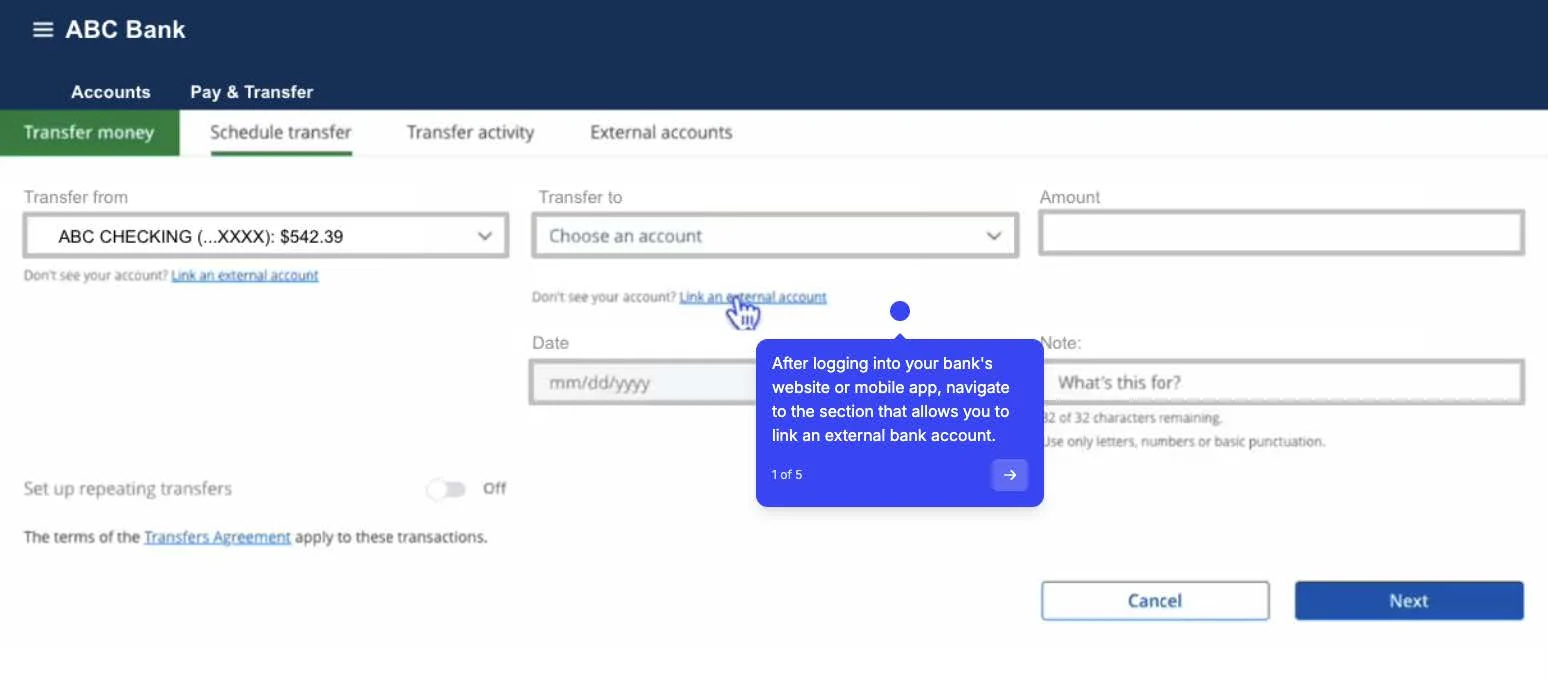
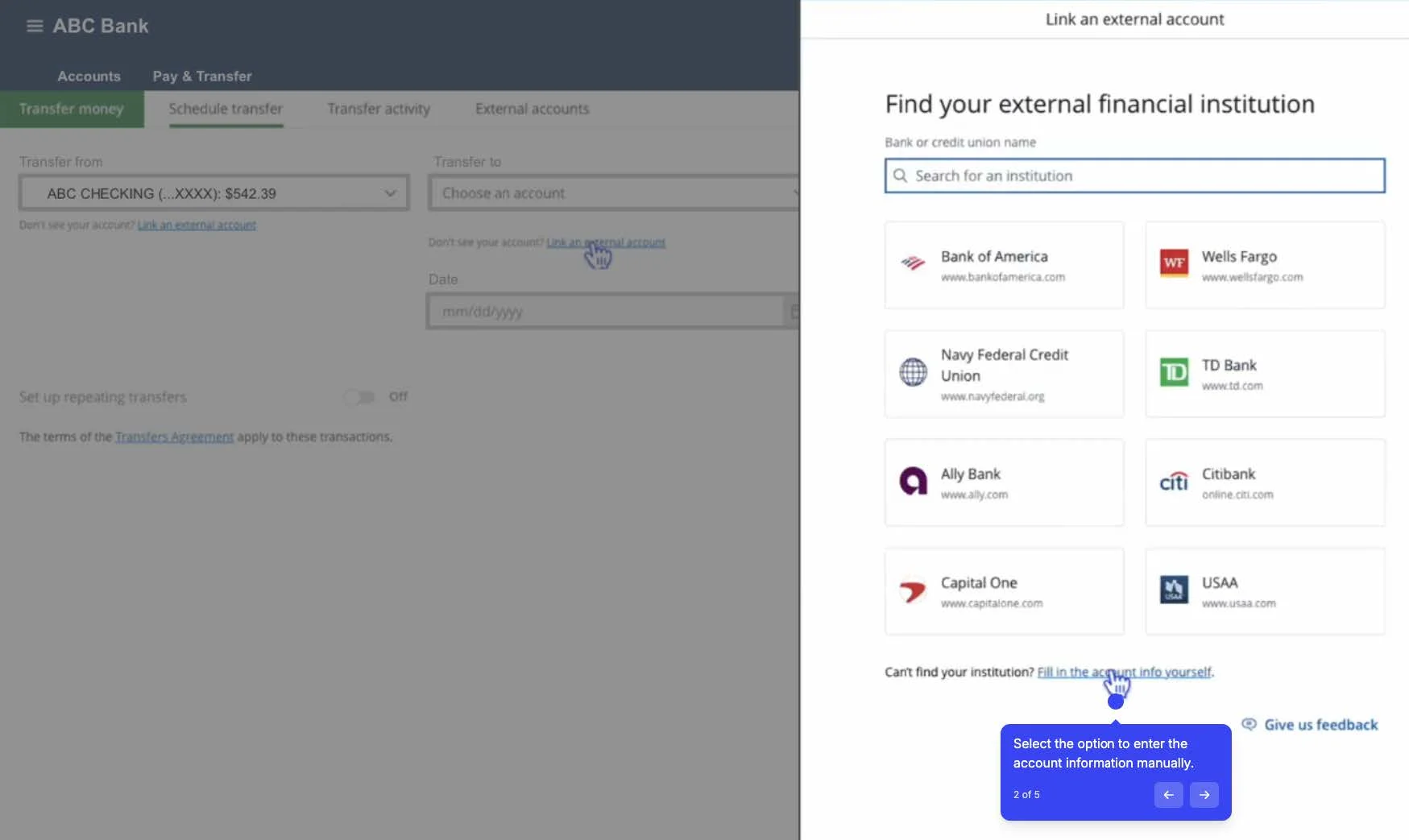
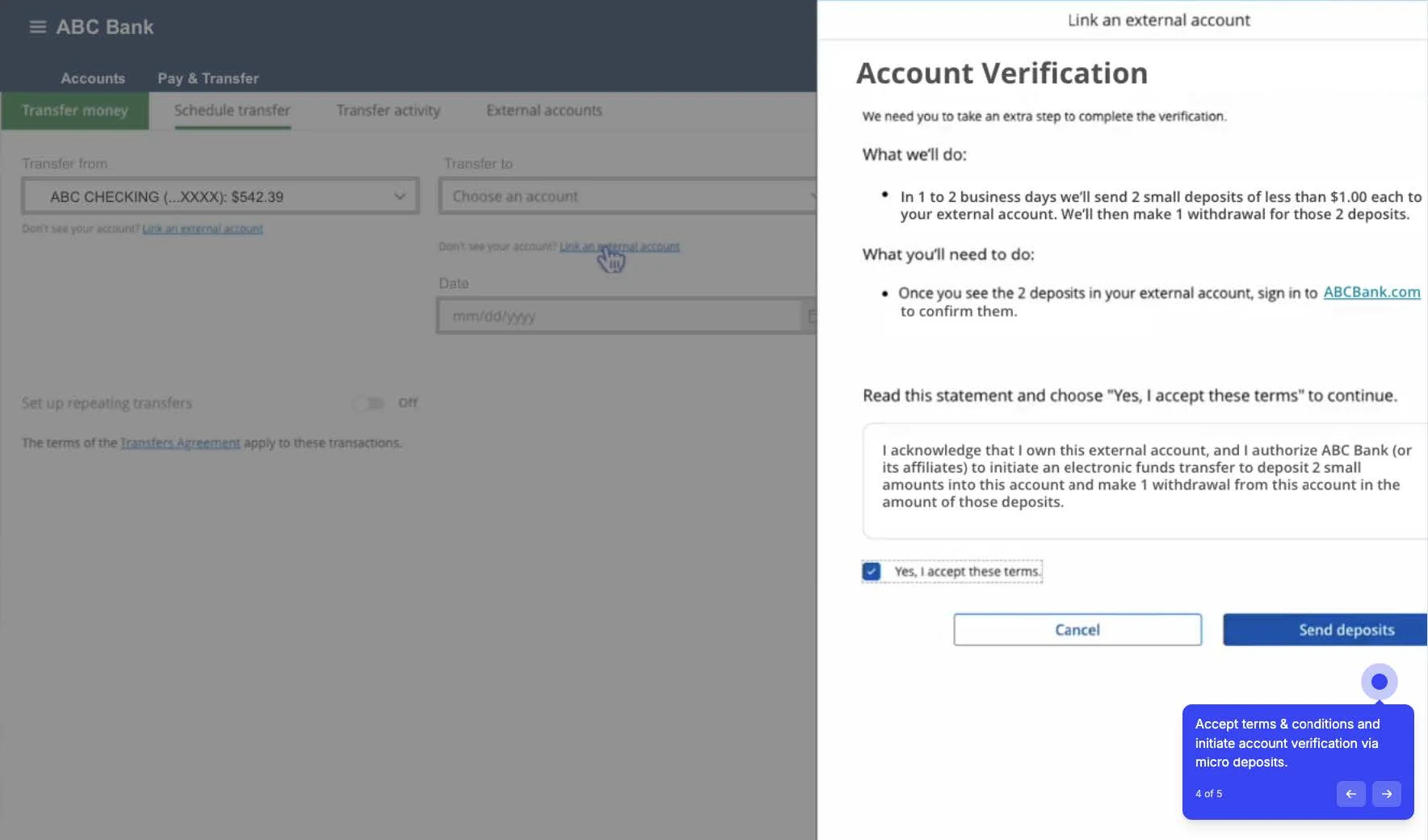
Micro-deposit verification is a standard security process used by many financial institutions to confirm that you are the owner of an external account. This is a common and secure way to link your Wyndham Rewards® Debit Account to an account at another financial institution.
Here is how the process works to link your external account to your Wyndham Rewards® Debit account:
-
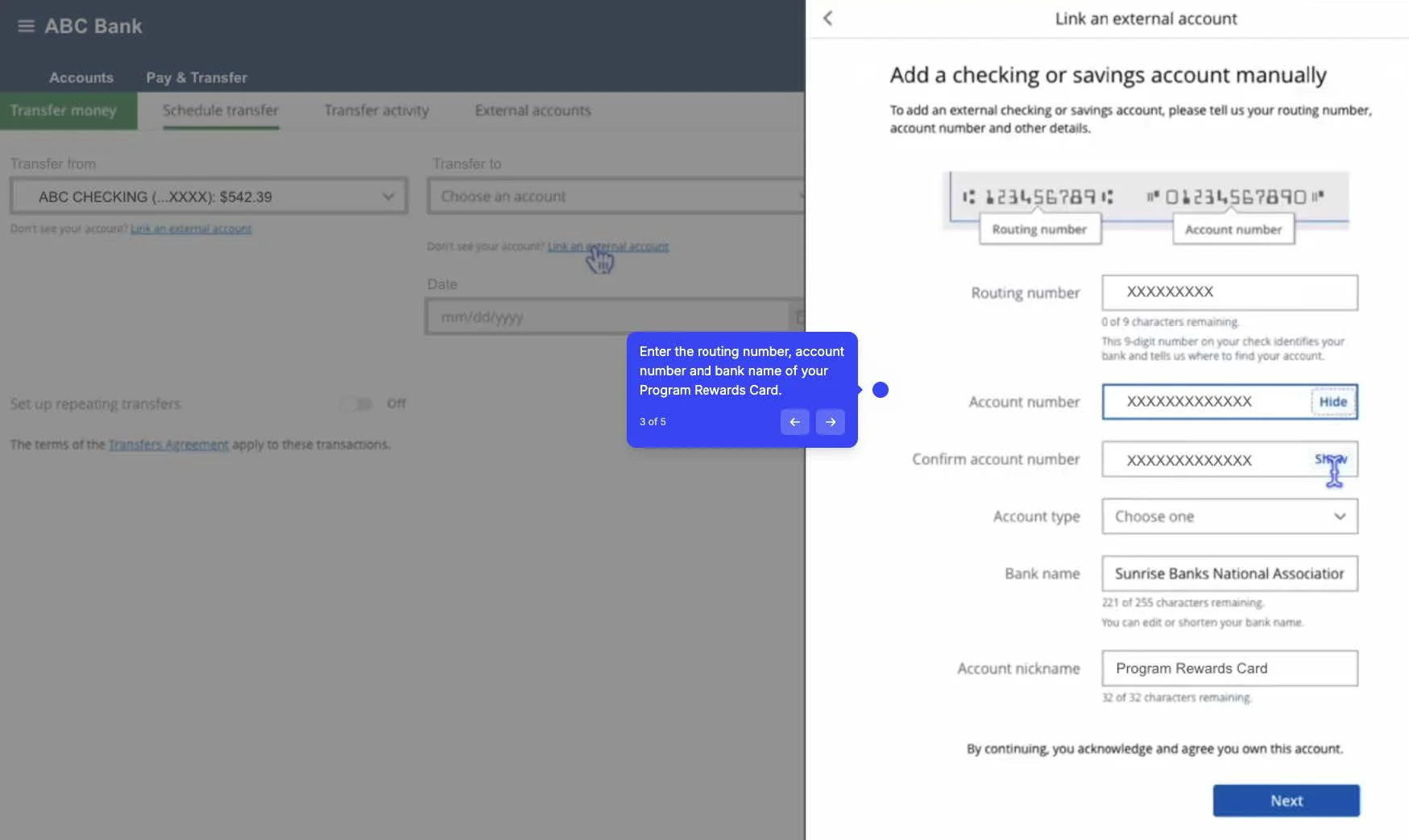
Initiate the Link. From your external bank’s website or mobile app, you will start the process to link a new account. You will need to provide your Wyndham Rewards® Debit account number and the routing number.
- To find your Wyndham Rewards® Debit account information (routing and account numbers), log in to the mobile app or website, go to the “fund my account” menu found in the “Transfers” tab. The routing number for your account is 091017138. Your unique account number, typically 7121010XXXXXX, will be displayed there. If you can’t find it online, check your account statements or contact customer service at 1-800-608-5970. Keep these numbers secure and use them cautiously for transactions like direct deposits.
- Watch for the Deposits. Once linked, the external bank will send one or two very small “test” deposits (typically under $1.00 each) and may send a corresponding withdrawal of the total amount. These will appear in your Wyndham Rewards® Debit card account’s transaction history, usually within 1-3 business days.
- Find the Amounts. You will need to log in to your Wyndham Rewards® Debit account online experience or the mobile app to find the exact amounts of these two small deposits.
- Verify the Link. Return to your external bank’s website or app and enter the two exact deposit amounts to confirm the link. Once you do, the accounts are linked and you can begin transferring money.
This process keeps your funds secure and prevents anyone from linking your accounts without your permission.
To securely enable transfers between your Chase account and your Wyndham Rewards® Debit account using the micro-deposit method, follow these steps:
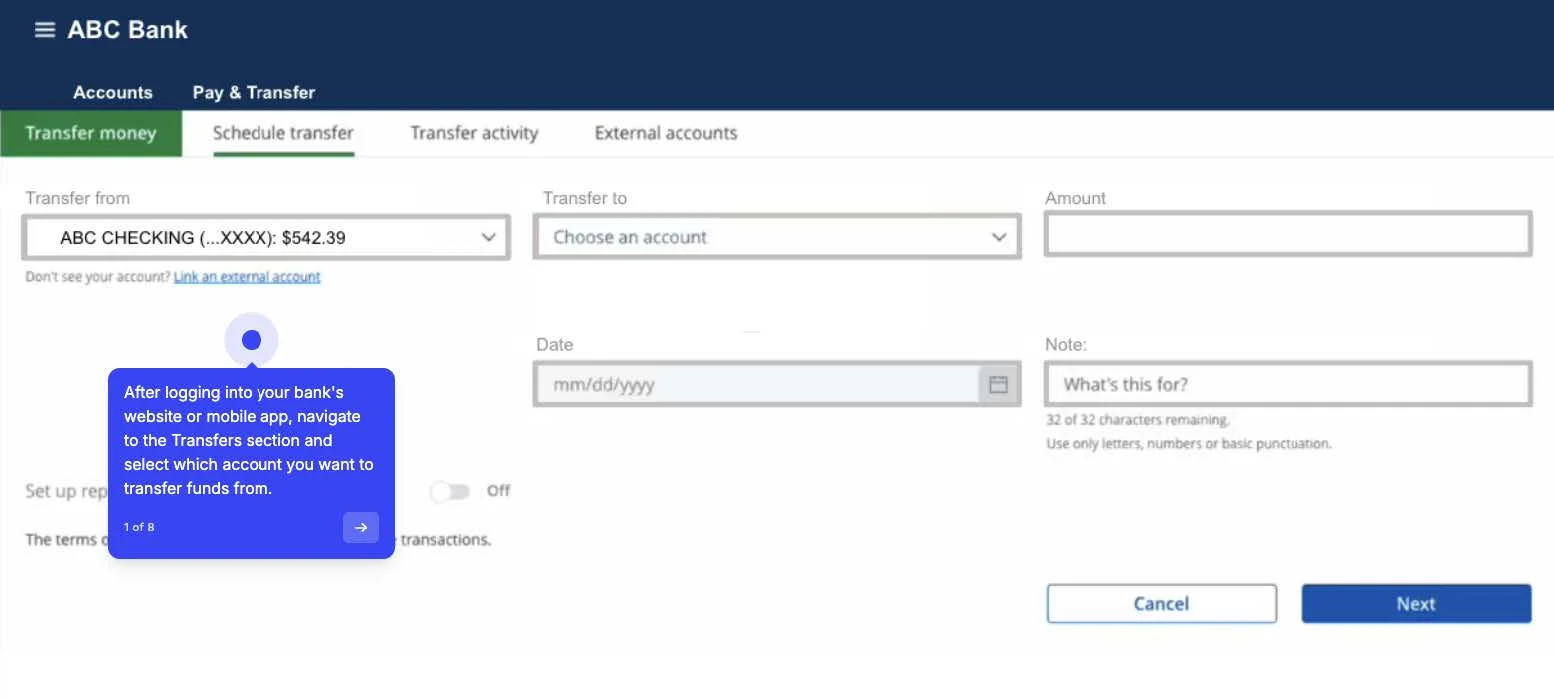
- Initiate Linking: Sign into your Chase Online (or the Chase Mobile app) and navigate to the “Pay & Transfer” tab, and select “Transfer Money”. Next, choose the option to “Link an external account” and complete the form using your Wyndham Rewards® Debit account routing number and account number.
- Trial Deposits Sent: Chase will then initiate a manual verification process by sending two small trial deposits (and one withdrawal for the total amount of the two deposits) to your Wyndham Rewards® Debit account. This process typically takes between 1-3 business days.
- Verification: Once the two small deposits appear in your Wyndham Rewards® Debit account, log back into Chase Online or the Chase Mobile app and follow the instructions to verify the two small deposit amounts.
- Account Activated: Once the amounts are correctly verified, your Wyndham Rewards® Debit account is linked and ready for bank-to-bank transfers.
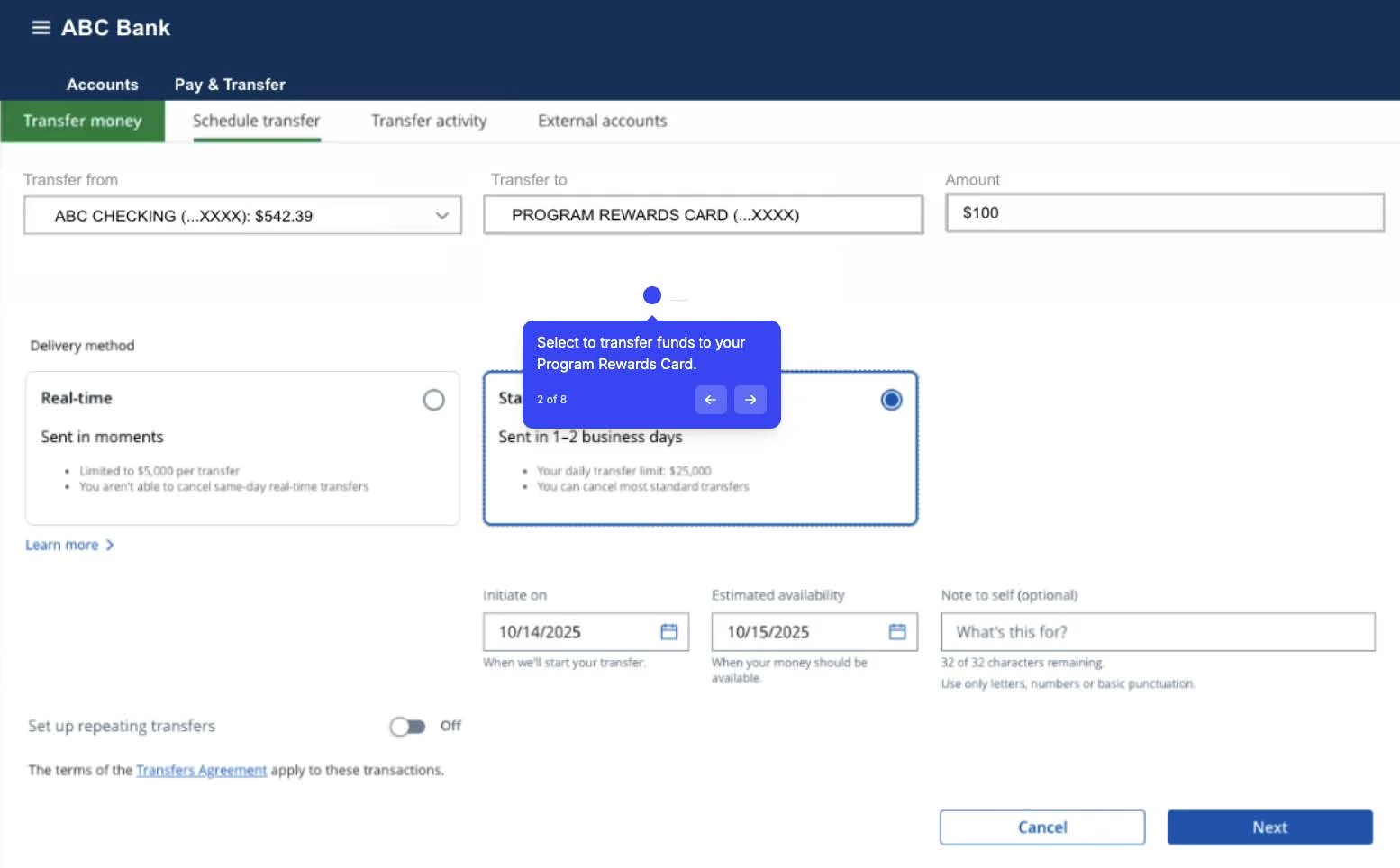
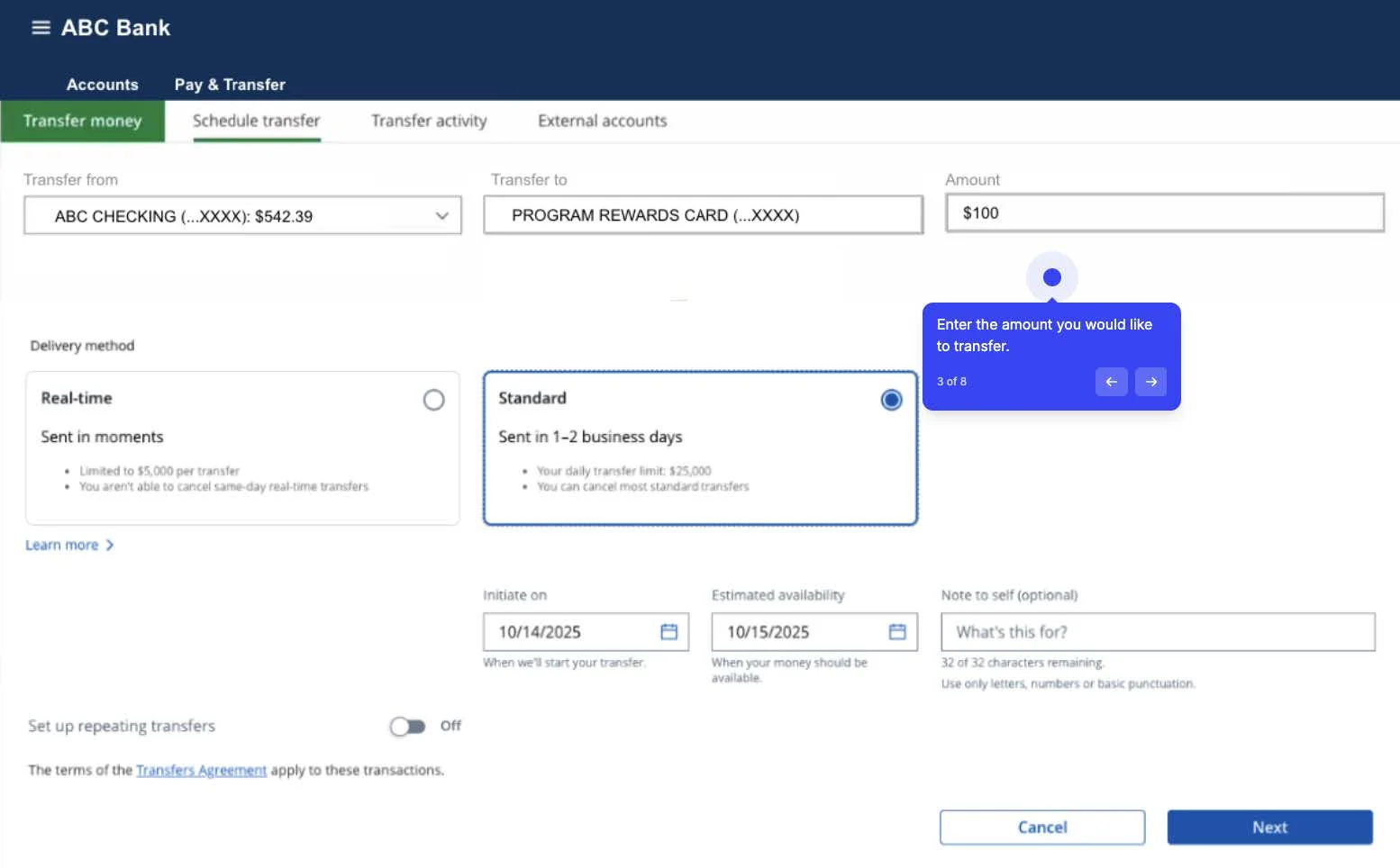
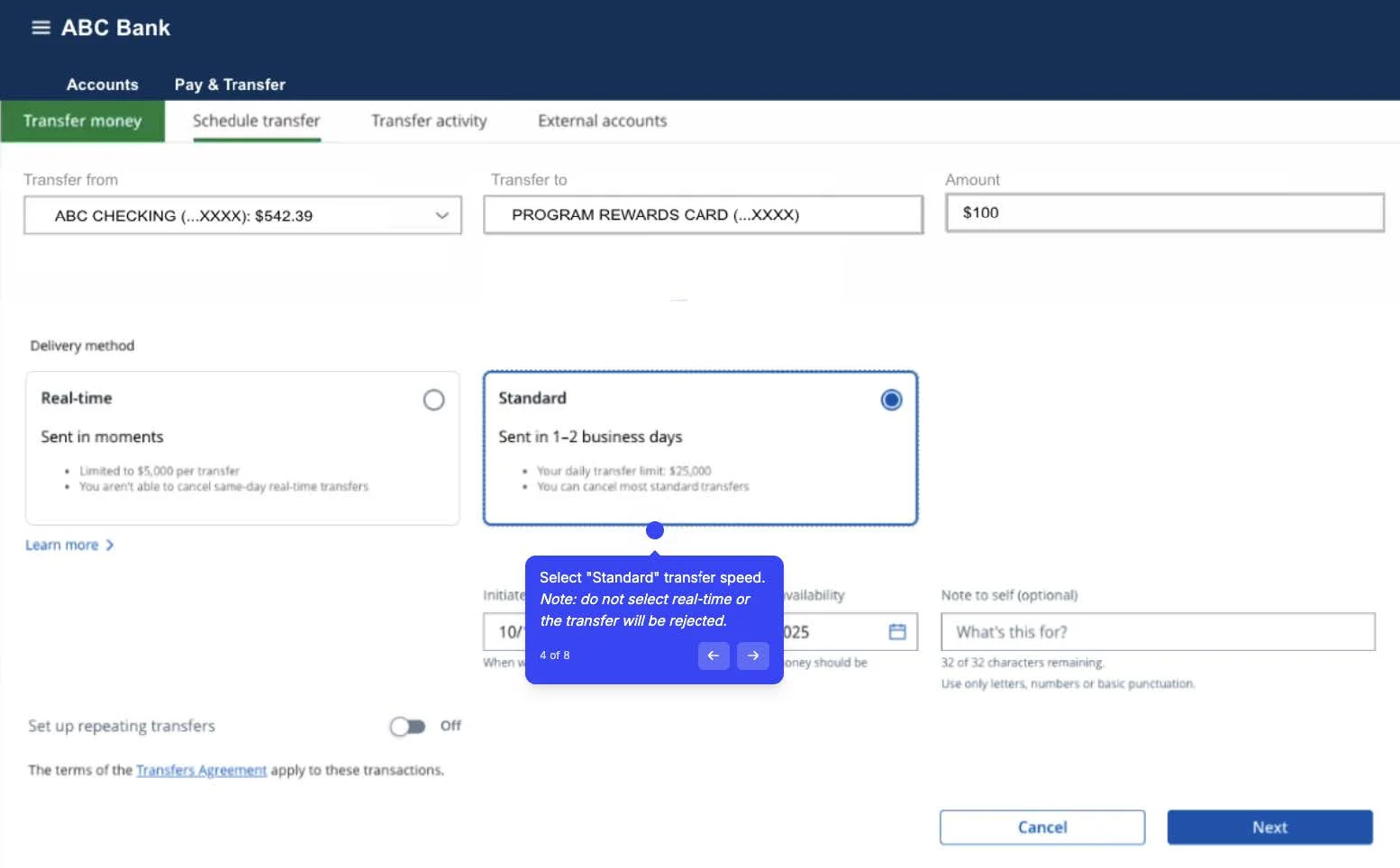
- Transferring: When initiating a transfer, please select 1-3 business day (Standard ACH) delivery to avoid transfer errors.
To securely enable transfers between your Bank of America account and your Wyndham Rewards® Debit account using the micro-deposit method, follow these steps:
- Initiate Linking: Sign into your Bank of America Online Banking or the Mobile Banking App and navigate to the “Pay & Transfer” menu. Next, select the “Send a wire/external transfer” option from the dropdown menu.
- Add Account Type: Click on the “Add Account/Recipient tab”. Select “Domestic (U.S.)” and “My personal account at another bank (only transfers to)”. Selecting “only transfers to” means you will use this link only to push money from Bank of America to the Wyndham Rewards® Debit account.
- Provide Details: You will be prompted to provide your Wyndham Rewards® Debit account account and routing number. You will also need to select Checking as the account type.
- Verify your identity: The “Add Account” button isn’t enabled until you check the box to verify your identity. Bank of America will ask for the security code sent to the number you set up in Secured Transfer.
- Micro-deposits: Once identity is verified, Bank of America will make two small deposits (micro-deposits), each less than $1.00, into your Wyndham Rewards® Debit account. This typically takes 1-3 business days to appear in the Wyndham Rewards® Debit account transaction history.
Once the verification is successful, you can begin transferring funds between your Bank of America account and your Wyndham Rewards® Debit account. When initiating a transfer, if prompted, please select 1-3 business day (Standard ACH) delivery to avoid transfer errors.
Please note: Transfers from Citigroup are currently not supported.
To securely enable transfers between your Wells Fargo account and your Wyndham Rewards® Debit account using the micro-deposit method, follow these steps:
- Initiate Linking: Log into your Wells Fargo online banking experience or mobile app and navigate to the “Transfer & Pay” section. You will then need to select “Add Non-Wells Fargo Accounts” under the Transfer Money menu.
- Provide Account Information: You will then need to provide your Wyndham Rewards® Debit account routing and account numbers including the Account Type (checking).
- Micro-Deposit Wait Period: Wells Fargo will initiate two small deposits (micro-deposits) to be sent to your Wyndham Rewards® Debit account. This verification typically takes 1–3 business days to complete.
- Verification: Once you see the two small amounts appear in your Wyndham Rewards® Debit account transaction history, you must sign back in to Wells Fargo online experience and enter the exact amounts of those two micro-deposits to confirm ownership and activate the new transfer link.
Once the verification is successful, you can begin transferring funds between your Wells Fargo account and your Wyndham Rewards® Debit account. When initiating a transfer, if prompted, please select 1-3 business day (Standard ACH) delivery to avoid transfer errors.
To securely enable transfers between your U.S. Bank account and your Wyndham Rewards® Debit account using the micro-deposit method, follow these steps:
- Initiate Linking: You will need to sign into your U.S. Bank digital banking experience or your U.S. Bank Mobile App.
- Add External Account: Once signed in, navigate to the “Transfer & pay” menu and select “External transfers & wires”. Then select the “Recipients & accounts” (or similar steps depending on the app’s current experience).
- Enter Account Details: You will need to select the option to “Add your account manually” and enter your Wyndham Rewards® Debit account routing and account number.
- Micro-Deposit Wait Period: U.S. Bank will send two small temporary deposits (micro-deposits), each less than $1.00, to your Wyndham Rewards® Debit account. This typically happens within 1-3 business days.
- Verify the Amounts: Once you see the two deposits in your Wyndham Rewards® Debit account, you must return to the Transfers section in your U.S. Bank digital banking experience. You will then select “Verify” next to the Wyndham Rewards® Debit account, and enter the exact amounts of the two deposits you received in your Wyndham Rewards® Debit account.
- Account Activated: Once the amounts are verified, the account status will change to Account Activated, and you will now be able to transfer funds to your Wyndham Rewards® Debit account. When initiating a transfer, if prompted, please select 1-3 business day (Standard ACH) delivery to avoid transfer errors.
To securely enable transfers between your PNC Bank account and your Wyndham Rewards® Debit account using the micro-deposit method, follow these steps:
- Initiate External Transfer: You will need to sign into your PNC online banking experience or the PNC Mobile App and navigate to the “Pay and Transfer” tab, then select “Transfers”. You will choose the option for “Make an External Transfer (transfer money between PNC and external accounts)”.
- Provide Account Details: You will then be prompted to enter your Wyndham Rewards® Debit account routing and account number. You will also need to select Checking as the account type.
- Micro-Deposit Sent: After submitting the account details, PNC will likely send two small micro-deposits (typically less than $1 each) to your Wyndham Rewards® Debit account. This is done to verify ownership and typically appears in your Wyndham Rewards® Debit account within 1-3 business days.
- Verification: Once you see the two deposit amounts in your Wyndham Rewards® Debit account, you must return to the “Make an External Transfer” section in your PNC digital banking experience and enter the two exact deposit amounts to confirm ownership.
- Account Activated: Once the amounts are confirmed, your Wyndham Rewards® Debit account is linked and can be used for transferring funds. When initiating a transfer, if prompted, please select 1-3 business day (Standard ACH) delivery to avoid transfer errors.
To securely enable transfers between your Truist account and your Wyndham Rewards® Debit account using the micro-deposit method, follow these steps:
- Initiate Linking: You will need to log into your Truist Online Banking experience or the Truist Mobile Banking App.
- Add External Account: Please navigate to the “Transfer & Pay” menu, then select “Manage external accounts”, and finally choose “Add non-Truist account”.
- Provide Account Details: You will need to manually enter your Wyndham Rewards® Debit account number and routing number.
- Verification Period: Truist will send two small micro-deposits to your Wyndham Rewards® Debit account. These deposits are typically less than $1.00 each and appear in your Wyndham Rewards® Debit account within 1-3 business days.
- Confirm the Amounts: Once you see the two deposit amounts in your Wyndham Rewards® Debit account, you must return to the “Manage external accounts” section in Truist digital banking experience and enter the two exact deposit amounts to confirm ownership.
After successful verification, your Wyndham Rewards® Debit account is fully linked and ready for bank-to-bank transfers. When initiating a transfer, if prompted, please select 1-3 business day (Standard ACH) delivery to avoid transfer errors.
To securely enable transfers between your Capital One account and your Wyndham Rewards® Debit account using the micro-deposit method, follow these steps:
- Initiate Linking: Please log into your Capital One online banking experience or the Capital One Mobile App and select “View Account”. Once completed locate the Manage External Accounts section of your account which is found under the “Accounts Services and Settings” menu.
- Add Account Details: Select “Add External Account”, then select “Transfer Money between Bank Accounts”. You will then be prompted to provide your Wyndham Rewards® Debit account routing and account number.
- Micro-Deposit Wait Period: Capital One will send two small micro-deposits to your Wyndham Rewards® Debit account to confirm ownership. These small transactions (each less than $1.00) are typically received within 1–3 business days.
- Verification: Once the micro deposits are received in your Wyndham Rewards® Debit account, you will need to return to your Capital One online banking experience and validate those micro-deposits.
Once the verification is successful, your Wyndham Rewards® Debit account is fully active for transfers. When initiating a transfer, if prompted, please select 1-3 business day (Standard ACH) delivery to avoid transfer errors.
To securely enable transfers between your TD Bank account and your Wyndham Rewards® Debit account using the micro-deposit method, follow these steps:
- Initiate Linking: Please log into your TD Bank online banking experience or the TD Bank App and access the transfer service. Then select the option to set up a transfer to a non-TD account (an external account).
- Provide Account Details: You will then need to input Wyndham Rewards® Debit account number and routing number.
- Micro-Deposit Wait Period: TD Bank will send two small micro-deposits to your Wyndham Rewards® Debit account to confirm ownership. These small transactions (each less than $1.00) are typically received within 1–3 business days.
- Verification: Once the micro deposits are received in your Wyndham Rewards® Debit account, you will need to return to your TD Bank online banking experience and validate those micro-deposits.
Once the verification is successful, your Wyndham Rewards® Debit account is fully active for transfers. When initiating a transfer, if prompted, please select 1-3 business day (Standard ACH) delivery to avoid transfer errors.
To securely enable transfers between your BMO Bank account and your Wyndham Rewards® Debit account using the micro-deposit method, follow these steps:
- Initiate Linking: Sign into your BMO Digital Banking Online or Mobile App Experience.
- Add External Account: Navigate to the “Pay & Transfer” section on the home screen, then select “Transfers to or from another bank”.
- Provide Account Details: Select “Add a New Account” and enter the routing and account number for your Wyndham Rewards® Debit account.
- Micro-Deposit Wait Period: BMO will make two small deposits (micro-deposits) into your Wyndham Rewards® Debit account within a few business days (typically 2-3 Business Days).
- Verify Account: Once the deposits are received in your Wyndham Rewards® Debit account, please return to your BMO Digital Banking experience and go to the “Verify External Account” page. There, you will enter the exact amounts of the two deposits to confirm the link.
After verification, your Wyndham Rewards® Debit account is fully active for transfers to and from your BMO account. When initiating a transfer, if prompted, please select 1-3 business day (Standard ACH) delivery to avoid transfer errors.
To securely enable transfers between your Citizens Bank account and your Wyndham Rewards® Debit account using the micro-deposit method, follow these steps:
- Initiate Linking: Sign into your Citizens Online Banking or mobile app experience. Next, select “Transfers”, then select “Launch External Transfers”.
- Add Account Details: You would then need to select “Add New Account” and provide your Wyndham Rewards® Debit account routing number and account number.
- Micro-Deposit Wait Period: Citizens Bank will send two small trial deposits into your Wyndham Rewards® Debit account. These deposits are typically received within 1–3 business days.
- Verify Account: Once the two small deposits appear in your Wyndham Rewards® Debit account transaction history, you must return to the “External Transfer” page within your Citizens online banking experience, select “Verify Deposit”, and enter the exact amounts of the two deposits.
After verification, your Wyndham Rewards® Debit account is fully active for transfers to and from your Citizens Bank account. When initiating a transfer, if prompted, please select 1-3 business day (Standard ACH) delivery to avoid transfer errors.
To securely enable transfers between your Charles Schwab account and your Wyndham Rewards® Debit account using the micro-deposit method, follow these steps:
- Initiate Linking: Sign into your Schwab online banking experience or the Schwab Mobile app and navigate to “Move Money”, “Transfers & Payments”, and select “External Accounts”.
- Add Account Details: Select “Add Account” and choose the Schwab account you wish to link from. You will then enter your Wyndham Rewards® Debit account routing number and account number.
- Micro-Deposit Wait Period: Schwab will initiate the micro-deposit process. Two small “trial deposits” (less than $1.00 each) will be sent to your Wyndham Rewards® Debit account. These typically arrive within 3 business days.
- Verification: Once you see the amounts of the micro deposits in your Wyndham Rewards® Debit account, you’ll return to the “External Accounts” section in your Schwab online banking experience or the Mobile App and follow the instructions to verify the trial deposits by entering the two exact amounts.
After verification, your Wyndham Rewards® Debit account is fully active for transfers to and from your Charles Schwab account. When initiating a transfer, if prompted, please select 1-3 business day (Standard ACH) delivery to avoid transfer errors.
To securely enable transfers between your State Street account and your Wyndham Rewards® Debit account using the micro-deposit method, follow these steps:
- Initiate Manual Link: Sign into your State Street bank’s online banking or mobile app and navigate to the external transfer or account management section. Select the option to “Add an Account Manually” (or similar wording).
- Provide Account Details: Next, enter the routing number and account number for your Wyndham Rewards® Debit account.
- Micro-Deposit Wait Period: State Street will send two small trial deposits (micro-deposits) to your Wyndham Rewards® Debit account. These deposits are typically less than $1.00 each and usually arrive within 1-3 business days.
- Confirm and Verify: Once the deposits appear in your Wyndham Rewards® Debit account’s history, log back into your State Street online banking. Locate the prompt or status update for the pending external account verification. You will need to enter the two exact deposit amounts to confirm ownership which will activate the link between the accounts.
After verification, your Wyndham Rewards® Debit account is fully active for transfers to and from your State Street account. When initiating a transfer, if prompted, please select 1-3 business day (Standard ACH) delivery to avoid transfer errors.
Account Verification Visual Aid
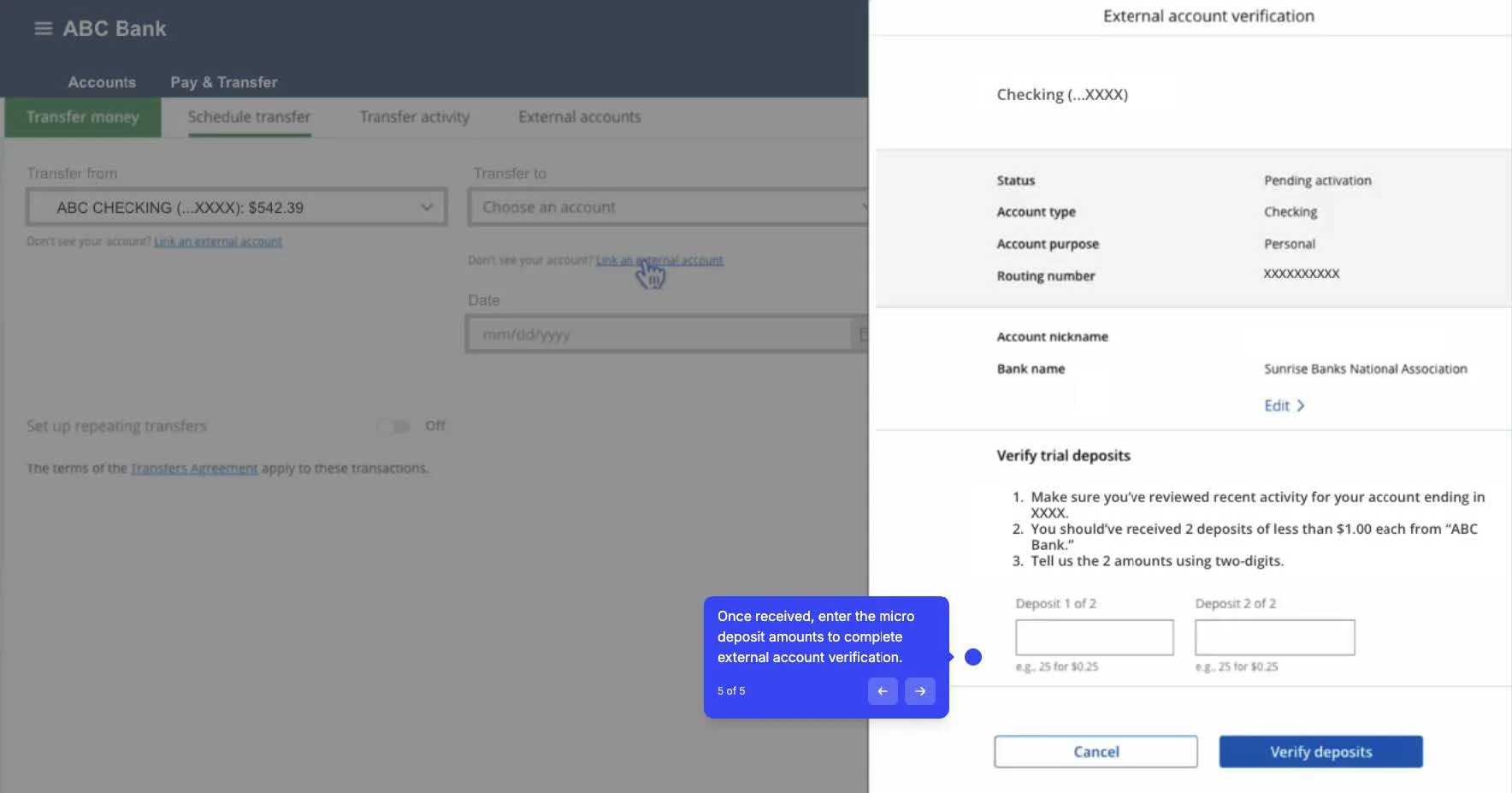
Account Transfer Visual Aid